Personal Cash Flow Template in Excel
Managing personal finances often feels simple at the beginning of the month and surprisingly confusing by the end of it. Income arrives, bills accumulate, subscriptions renew automatically, unexpected purchases appear, and savings goals slowly lose visibility. Over time, many individuals discover that financial stress rarely comes from one major expense alone. More often, it emerges from the absence of a clear and structured cash flow view.
That reality explains why a well-designed personal cash flow template in Excel remains one of the most practical financial tools available today. Unlike complex accounting software filled with unnecessary functions, a one-page Excel template offers clarity, flexibility, and immediate control over monthly finances.
The objective extends far beyond recording expenses. A strong cash flow sheet transforms financial data into actionable insight. It reveals where money enters, where it disappears, and how financial habits evolve over time.
The model created here was designed precisely with that philosophy in mind: simplicity combined with professional-level visibility.
Why Personal Cash Flow Tracking Matters More Than Budgeting Alone
Traditional budgeting often focuses on planned spending categories. Cash flow tracking introduces a deeper perspective. Instead of simply defining limits, it monitors the actual movement of money throughout the month.
That distinction changes everything.
A household may technically respect its budget while still facing liquidity pressure because expenses occur earlier than income arrivals. Likewise, a freelancer may generate excellent revenue yet struggle financially due to irregular payment cycles.
Cash flow analysis highlights these hidden tensions.
A personal cash flow template allows users to:
- Monitor monthly inflows and outflows
- Anticipate difficult financial periods
- Identify unnecessary recurring expenses
- Evaluate savings capacity
- Improve financial discipline
- Reduce impulsive spending patterns
- Prepare for emergencies with greater confidence
Most importantly, it creates financial awareness. Once individuals visualize how money circulates across categories, decision-making becomes significantly more rational.
What Makes a One-Page Excel Cash Flow Template So Effective
Large financial workbooks sometimes become counterproductive. Too many tabs, formulas, and hidden sheets discourage regular use. A one-page structure creates the opposite effect: instant readability.
Everything appears in a single dashboard-like environment.
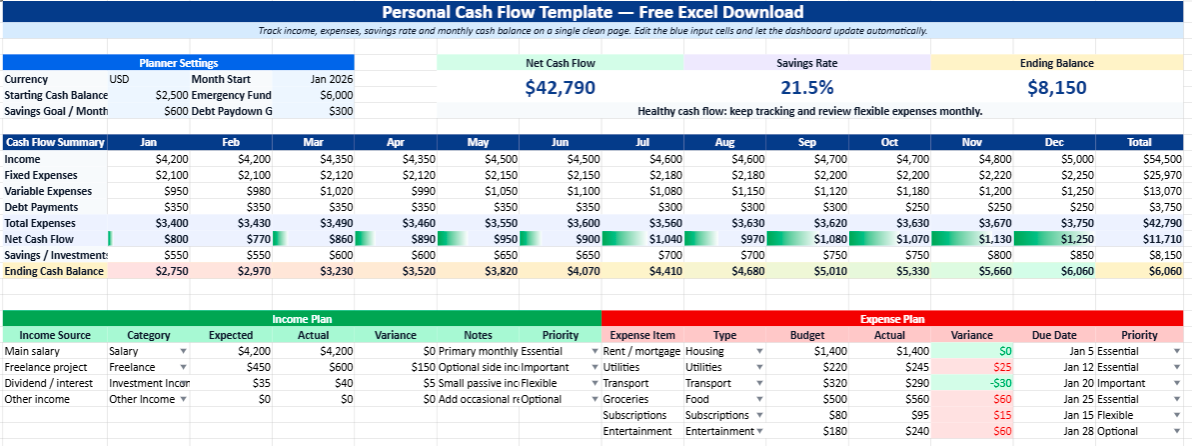
The Excel model developed for this template includes:
- Monthly income tracking
- Expense categorization
- Budget versus actual comparison
- Automatic totals
- Net cash flow calculation
- Financial indicators
- Color-coded sections
- Professional visual structure
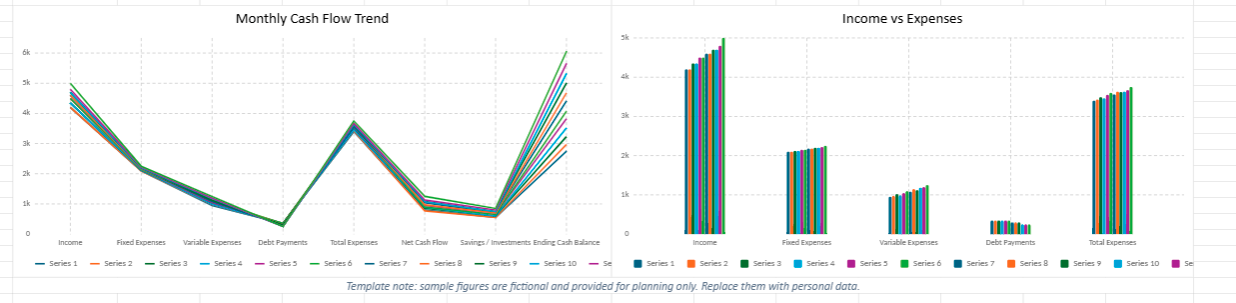
- Built-in charts for rapid interpretation
This layout mirrors the logic used in many business finance dashboards while remaining perfectly accessible to individual users.
The visual aspect also matters more than many people expect. Colors, KPI cards, highlighted balances, and organized sections reduce cognitive overload. Financial tracking becomes less intimidating and more engaging.
Understanding the Core Components of the Template
Income Section
The income area centralizes all revenue streams in one location. This includes:
- Salary
- Freelance payments
- Side business income
- Rental revenue
- Investment returns
- Bonuses
- Other occasional earnings
Separating income sources provides a more realistic understanding of financial dependence. Many users discover that a large portion of their stability relies excessively on one single source of income.
That insight often becomes the starting point for diversification strategies.
Expense Categories
One of the strongest features of a structured cash flow template lies in expense classification.
Instead of seeing expenses as a chaotic list, the model organizes them into logical financial families:
- Housing
- Transportation
- Food and groceries
- Utilities
- Healthcare
- Insurance
- Entertainment
- Education
- Debt repayments
- Savings contributions
- Miscellaneous expenses
This categorization immediately reveals behavioral patterns.
Some users realize they underestimate digital subscriptions. Others discover that convenience spending quietly consumes a major percentage of monthly liquidity.
Without categorization, these patterns remain invisible.
Net Cash Flow Calculation
The heart of the model lies in the net cash flow indicator:
\text{Net Cash Flow} = \text{Total Income} – \text{Total Expenses}
A positive value indicates financial surplus. A negative result signals structural imbalance.
Tracking this indicator month after month helps users evaluate whether their financial trajectory is improving or deteriorating over time.
More importantly, it encourages long-term thinking instead of short-term emotional spending decisions.
The Psychological Impact of Financial Visibility
Financial organization produces psychological benefits that spreadsheets rarely receive credit for.
When people ignore their financial situation, uncertainty grows. Small expenses become emotionally heavier because the overall picture remains unclear.
A transparent cash flow dashboard creates reassurance.
Users no longer guess whether they can afford something. They know.
That visibility reduces financial anxiety while encouraging healthier decision-making habits. Even individuals with moderate income levels often feel significantly more stable once their finances become structured and measurable.
In many cases, the issue is not purely income-related. It is visibility-related.
Why Excel Remains One of the Best Financial Management Tools
Despite the rise of mobile budgeting apps, Excel continues to dominate personal financial planning for several reasons.
Flexibility
Users fully control formulas, categories, structure, and customization. Unlike closed platforms, Excel adapts to personal financial realities.
Offline Accessibility
Financial data remains accessible without subscriptions or internet dependency.
Long-Term Tracking
Excel files can evolve over years, creating valuable historical financial records.
Privacy
Many users prefer storing personal financial data locally rather than connecting bank accounts to third-party applications.
Visual Reporting
Charts, conditional formatting, and dashboard elements transform raw numbers into meaningful analysis.
This combination explains why Excel remains heavily used by financial professionals, entrepreneurs, consultants, and households alike.
Who Can Benefit from This Personal Cash Flow Template
The template adapts to a wide variety of financial profiles.
Employees
Salary earners can track recurring expenses, monthly savings, and budget consistency.
Freelancers
Irregular income cycles become easier to manage through cash flow forecasting.
Students
The model helps monitor limited budgets while building financial discipline early.
Couples and Families
Shared expenses become more transparent and easier to coordinate.
Entrepreneurs
Small business owners frequently use personal cash flow templates alongside business dashboards to separate professional and personal finances.
The Importance of Monthly Financial Reviews
Using a template once provides limited value. The real transformation occurs through consistency.
A monthly financial review creates a routine of observation and adjustment.
Questions users should ask every month include:
- Which expenses increased unexpectedly?
- Which categories remained stable?
- Did savings objectives progress?
- Which subscriptions or recurring charges lost usefulness?
- Is income diversification improving?
- Are emergency reserves growing sufficiently?
Over time, these reviews sharpen financial intelligence.
Money management gradually becomes proactive instead of reactive.
Building Better Financial Habits Through Automation
One underrated advantage of Excel templates involves habit reinforcement.
Once users begin updating the file regularly, financial awareness naturally strengthens.
Small improvements accumulate:
- Faster expense recognition
- Reduced impulsive purchases
- Better anticipation of recurring payments
- More deliberate savings decisions
- Increased accountability
Financial stability rarely appears suddenly. It emerges from repeated small decisions supported by consistent visibility.
A strong cash flow template acts as the operational framework behind those decisions.
A Professional Financial Dashboard for Everyday Use
Many people associate dashboards with corporate finance environments. Yet personal finance increasingly benefits from the same analytical principles.
The template developed here integrates professional dashboard logic into a user-friendly format:
- Clean structure
- Color-coded KPI indicators
- Simplified navigation
- Automatic calculations
- Visual summaries
- Monthly monitoring capabilities
This transforms financial tracking from a passive spreadsheet into an active decision-support tool.
The result feels closer to a financial command center than a simple expense sheet.
Personal Cash Flow Template in Excel – A Clearer Way to Understand Your Monthly Finances
Money rarely disappears dramatically. Most of the time, it fades little by little through everyday routines that seem harmless in the moment — a subscription renewed automatically, an unplanned purchase during the week, a few restaurant orders, transport costs, small online payments, or expenses quickly forgotten after they happen. At the end of the month, many people discover that the real difficulty is not always income itself, but the lack of visibility over how money actually moves.
This one-page Personal Cash Flow Template in Excel was created to solve that problem in a practical and visually organized way.
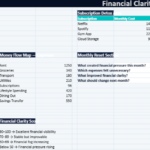
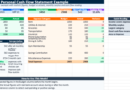
Rather than functioning like a rigid accounting spreadsheet, the file was designed as a personal financial dashboard that helps users understand the rhythm of their monthly finances more naturally. Income, expenses, savings, balances, and spending categories appear together inside a clean and modern layout, allowing users to gain a complete overview without navigating multiple tabs or complicated formulas.
The workbook combines financial simplicity with professional dashboard logic. Salary, freelance income, side earnings, recurring bills, household expenses, transportation costs, subscriptions, savings contributions, and other financial movements can all be monitored in one structured environment. As the information is updated, the template automatically recalculates the monthly balance and instantly reflects the overall financial situation.
At the center of the dashboard, the net cash flow calculation helps users understand whether money remains available after monthly expenses:
\text{Net Cash Flow} = \text{Total Income} – \text{Total Expenses}
The visual presentation was intentionally designed to make financial tracking feel clearer and less overwhelming. Color-coded sections, financial indicators, organized tables, and integrated charts transform raw numbers into information that feels readable and immediately useful. Instead of staring at endless rows of transactions, users can quickly identify which areas consume the largest part of their budget and how their financial habits evolve over time.
The template adapts easily to different lifestyles and financial situations. Employees can monitor monthly salary management, freelancers can follow irregular income cycles, students can organize limited budgets more effectively, and families can gain better visibility over shared household expenses. The flexible structure also allows users to personalize categories according to their own financial priorities.
Beyond calculations, the file was created to bring a sense of clarity back into personal finance. Financial organization often becomes easier once money stops feeling abstract. Seeing income, expenses, and savings inside a structured dashboard changes the way decisions are made during the month. Spending patterns become more visible, savings goals feel more realistic, and financial choices gradually become more intentional.
More than a traditional spreadsheet, this Excel template functions as a practical financial visibility tool designed to transform scattered monthly transactions into a clearer and more manageable financial picture.