
Why Every Scout Troop Should Use a Merit Badge Tracking Spreadsheet
Earning merit badges is one of the most rewarding and structured parts of a Boy Scout’s journey. Each badge represents a skill, a life lesson, or a challenge overcome — and with over 135 merit badges offered, the possibilities for personal growth are endless.
But with so many scouts, varying schedules, and different levels of progress, it’s easy to lose track of who’s working on what, who’s completed what, and which counselor to follow up with. That’s where a well-designed Merit Badge Tracking Spreadsheet comes into play.
Let’s explore why this tool is so useful, what an effective tracking system looks like, and how it benefits not just scouts, but troop leaders, counselors, and parents alike.
The Challenge: Managing Merit Badge Progress at Scale
If you’ve ever attended a troop meeting with over 15 scouts, you know how quickly things get chaotic. One scout has finished Camping, another forgot their workbook, a few are halfway through Emergency Preparedness, and one hasn’t even started First Aid yet.
Without a consistent way to manage this data, it often falls on sticky notes, memory, or scattered notebooks. This can lead to:
- Missed advancement opportunities
- Redundant work (repeating completed steps)
- Frustration for scouts and leaders
- Limited visibility for parents or committee members
A centralized, digital spreadsheet solves this problem almost instantly.
The Solution: A Smart, Customizable Spreadsheet
A Merit Badge Tracking Spreadsheet isn’t just a list of names and checkboxes. It can be a dynamic, colorful, filterable, and even semi-automated document that gives everyone clarity at a glance.
Here’s what a great tracker typically includes:
1. Scout Information
- Full Name
- Troop Number
- Contact or rank (optional)
2. Badge Details
- Name of Merit Badge
- Counselor Assigned
- Category (e.g., Outdoor Skills, Citizenship, STEM, etc.)
3. Progress Tracking
- Completion Percentage (0–100%)
- Date Earned
- Automatically Calculated Status:
- “Not Started”
- “In Progress”
- “Completed”
With basic formulas (like =IF(progress=100%, "Completed", ...)), you can instantly sort or filter scouts based on status. That means troop leaders can quickly find out:
- Who’s eligible for a Court of Honor
- Which scouts need a reminder to finish steps
- Which counselors are being overburdened
Real-Life Use Cases
➤ Troop-Level Planning
At a glance, leaders can decide which badges to schedule group workshops for. If half the troop is “In Progress” for First Aid, that may be the next focus.
➤ Scoutmaster Conferences
Before a conference, a leader can print or access a scout’s personalized badge report. It shows effort, interests, and accomplishments.
➤ Court of Honor Preparation
No more scrambling to figure out who earned what. The spreadsheet tells you instantly.
➤ Parent Engagement
Parents can be given view-only access or sent updates so they can help motivate scouts at home. It’s a simple way to turn a spreadsheet into a growth map.
Design That Matters
The best spreadsheets are not just functional — they’re friendly and fun. A great tracker uses:
- Color-coding to distinguish statuses
- Drop-down lists for badge names, counselors, or status
- Filtered views to slice data by badge, scout, or troop
- Alternating row colors for better readability
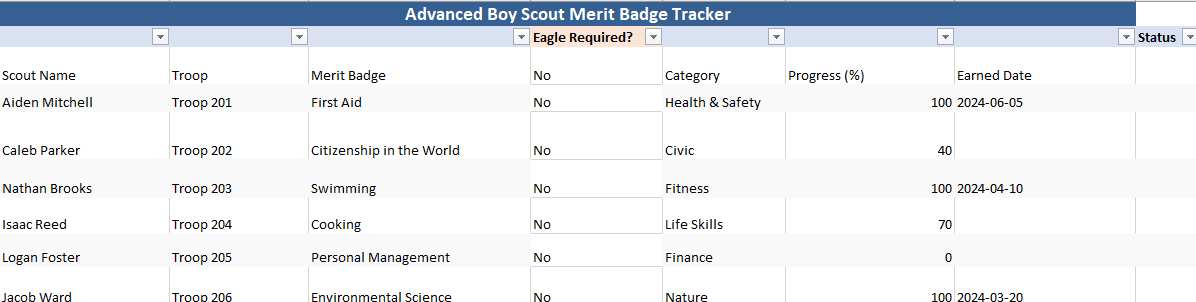
In our Advanced Boy Scout Merit Badge Tracker, we’ve implemented:
- A calculated status field based on progress percentage
- Columns for badge category and counselor
- Filters and soft formatting for print or on-screen use
And because it’s built in Excel, it’s highly adaptable for Google Sheets or other platforms.
🏕️ Why It Helps Scouts
This isn’t just an adult tool — it’s a scout leadership tool. When scouts take responsibility for updating their own progress, they learn:
- Accountability
- Planning and prioritization
- Communication with counselors
- The value of data in decision-making
Many scouts go on to use these skills in high school, college planning, and beyond.
Tips for Implementation
Here’s how to put a merit badge tracker into action:
1. Start Simple
Begin with a basic template that covers the essentials: name, troop, badge, status, and earned date.
2. Assign a Record-Keeper
This could be the troop scribe, advancement chair, or a responsible adult. One person should maintain “official” records to avoid confusion.
3. Use Shared Access (Optional)
Upload the file to Google Drive or OneDrive and allow view or edit access based on roles.
4. Schedule Regular Updates
Encourage scouts to report progress monthly or after major events. Sync the tracker with blue card confirmations or counselor sign-offs.
5. Celebrate Milestones
Use the tracker to recognize progress — even halfway completion is worth celebrating.
From Tracking to Inspiring
A merit badge spreadsheet might seem like a simple tool, but it opens the door to growth, organization, and celebration. It helps scout leaders serve their youth better, gives parents peace of mind, and empowers scouts to own their journey.
It’s not about ticking boxes — it’s about unlocking potential. Every line in the spreadsheet tells a story: of effort, curiosity, courage, or resilience. That’s what scouting is all about.
So whether you’re tracking ten scouts or a hundred, a Merit Badge Tracker can transform your troop’s operations — and elevate the experience for everyone involved.

Using a Merit Badge Tracking Spreadsheet in the Boy Scouts of America
While a Merit Badge Tracking Spreadsheet can aid in coordinating a Scout’s progress, its usefulness depends upon crafting a system acknowledging each Scout’s journey. Juggling requirements, rank advancements, and partnerships with leaders and counselors demands forethought. A flexible spreadsheet adapts to unpredictable experiences while maintaining organization. Shorter sentences paired with more intricate phrases encourage exploration yet record achievements. Deviations emerge, but focus remains on lessons learned through perseverance against challenges in each Scout’s personalized path. Skill mastery varies across diverse interests, but relationships and responsibilities found along the way unite their development.
The Merit Badge Tracking Spreadsheet aims to be just such a system. Tailored for the unique structure of BSA programs, it offers a platform for Scouts and those guiding them to navigate requirements from early ranks up through Eagle in a collaborative yet personalized manner. With features accounting for essential elements like which badges fulfill Star, Life and Eagle distinctions or who serves as resource for particular areas of study, it facilitates responsibility among users while maintaining alignment with overarching goals of leadership, skill-building and service. Especially for larger troops engaged in additional learning venues, meticulous coordination proves pivotal and this digital tool assists in keeping all parties informed.
Considering merit badges represent concrete abilities attained alongside personal growth, properly documenting progress holds significance. The spreadsheet was created with an understanding of both the bureaucratic necessities for rank confirmation as well as the less rigid yet no less meaningful nature of an individual’s Scouting experience. Able to be tailored yet standardized, it supplies structure without constraint, helping ensure each Scout’s journey is enthusiastically supported and duly recorded from start to finish.
Column Purpose Overview
| Column | Purpose |
|---|---|
| Scout Name | Full name for matching with troopmaster or blue cards |
| Troop | Especially useful in multi-troop or district-wide events |
| Merit Badge | Any of the 135+ BSA-recognized badges |
| Category | e.g., STEM, Outdoors, Life Skills, Civic — optional classification |
| Progress (%) | Numeric input (0–100%) to allow visual measurement |
| Earned Date | When the badge was completed and signed off |
| Status | Formula-based: “Completed,” “In Progress,” or “Not Started” |
This model streamlines advancement tracking in a way adaptable to any troop. Whether reviewing progress around a meeting table or making notes in the wilderness, scouts and leaders can efficiently document accomplishments thanks to its versatility across platforms.
Real-World Application with Ohio Troop 202
Following a fruitful summer camping expedition in the Keystone State, Troop 202’s advancement monitor had an arduous task ahead — sorting through dozens of partial blue cards and scrawled logs recording badges begun but unfinished. Fortunately, an electronic ledger offered relief, enabling quick updates indicating complete and continuing efforts while readily pairing each scout to assisting counselors.
Come honors night, all was clearly presented to recognize dedication fairly as records prepared for submission to Scouting’s record systems.
How It Enhances Existing Resources
While units commonly rely on Scoutbook, TroopMaster or similar tools, spreadsheets afford noteworthy perks:
- Access from any device regardless of internet or login
- Off-grid usability ideal for backcountry excursions
- Advanced filtering and custom views to supplement core data with unit-specific context
For many troops, it serves as an interim work-in-progress before synchronizing achievements to Scouting’s formal databases.
Where Value Shines Brightest
- Summer Camp: Scouts frequently start multiple badges under new counselors. This sheet streamlines review of partials needing follow-up to fully round out requirements for each award earned.
- Merit Badge Universities: Provided an organized approach for scouts to progress through requirements with assigned sessions and counselors overseeing their advancement. The system efficiently aided recognition of already completed badges for each scout’s individual path toward Eagle. Leaders found streamlined distribution of badges a breeze when multitudes gathered at district events with one standardized digital tracker maintaining all updates centrally.
Implementation & Roles
Roles were assigned to optimize utilization:
- Data ownership fell to the advancement chair maintaining official records
- Volunteers aided inputting updates at meetings
- Self-reporting allowed scouts accountability submitting changes for approval
Eagle prerequisites popped prominently through filtering highlighting priorities.
Consistent updating marked accomplishments. Over summers, detached signatures, and specialized workshops scouts earned credit keeping progress visible. Optional linkage imported working spreadsheets into centralized Scoutbook upholding recordkeeping standards.
🌟 Personal Development Outcomes
Personal development resulted from visualizing journey. Life Scouts planning for Scouting’s highest rank examined remaining requirements — especially timed needs like Personal Management.
Measurable progress motivated continuing accountability for one’s path, reflecting a core Scout Law tenet.
Beyond a Spreadsheet
Beyond a simple spreadsheet, entries documented lessons, strengths, citizenship, first aid, communication and physical fitness cultivated through over a century of Scouting.
Each scout’s story unfolded with badgework showcasing character development and leadership experience.
Flexible for Any Troop
Whether your small band of scouts resides in the remote wilderness of Montana or your expansive brigade operates in the bustling city of New York, this organizer adapts to your unique methods and environment.
Prepared to Begin?
Obtain the preconfigured spreadsheet and start personalizing it to suit your troop’s circumstances. You are able to customize:
- Insert your distinctive emblem
- Sort according to scout leaders
- Utilize it collaboratively in Google Sheets
- Integrate it into preparations for your Court of Honor recognition ceremony