A team rarely loses efficiency all at once. In most organisations, the imbalance appears gradually. A few deadlines begin to overlap, certain employees carry more tasks than others, urgent priorities interrupt the original schedule, and managers start to realise that visibility is no longer strong enough. What seemed manageable at first becomes harder to coordinate. At that point, team resource planning stops being a useful administrative habit and becomes a real operational necessity.
This is exactly where a team resource planning template in Excel becomes valuable. It gives managers, team leaders, project coordinators, and operations staff a structured way to organise people, tasks, workload, availability, and deadlines in one clear document. More importantly, it turns scattered information into a planning system that can support better decisions.
Excel remains one of the most practical tools for this purpose. It is familiar, flexible, and easy to adapt to different industries, whether the team works in project management, engineering, HR, consulting, administration, construction, or service delivery. A well-built spreadsheet can help organisations plan resources more carefully without immediately moving into a heavy software environment.
What team resource planning really means
Team resource planning is the process of matching people’s time, skills, and availability with the work that needs to be completed. It aims to answer practical questions such as who is available this week, which team member has the right skills for a specific task, where the workload is becoming too heavy, and where spare capacity still exists.
This type of planning matters because work is rarely distributed evenly on its own. Some employees become overloaded while others remain underused. Some projects move forward quickly because they receive enough support, while others slow down because the right people are unavailable at the right moment. Without a clear planning tool, these imbalances often stay hidden until they begin to affect deadlines, quality, morale, or client satisfaction.
Why Excel still works so well
Even with the growth of specialised planning platforms, Excel continues to hold a strong advantage in many workplaces. One reason is accessibility. Most organisations already use spreadsheets every day, so the learning curve remains low. Another reason is adaptability. Excel can be shaped around the real structure of a team rather than forcing the team to adjust to a rigid system.
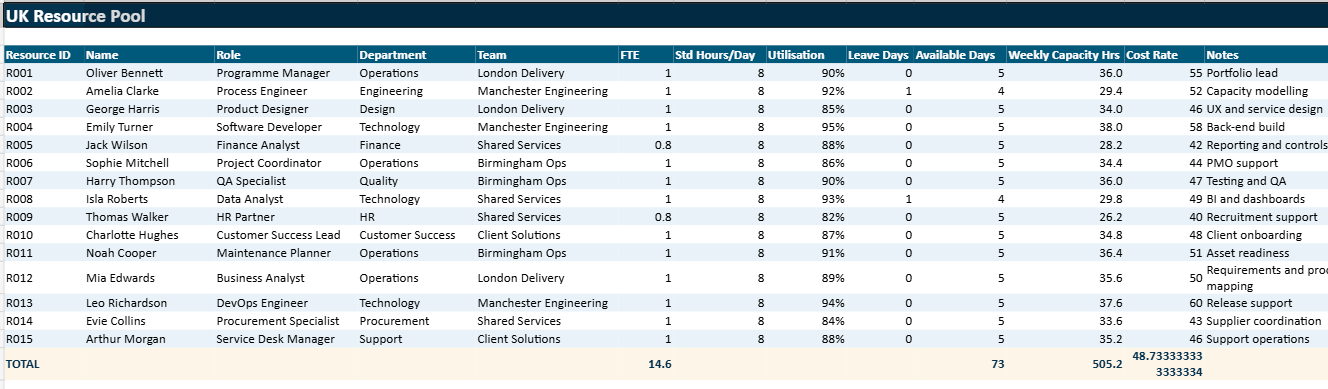
A spreadsheet can include employee names, departments, roles, daily or weekly availability, project assignments, hours planned, hours used, deadlines, task status, utilisation levels, and dashboards. With formulas, conditional formatting, and charts, it becomes possible to turn a simple workbook into a practical planning instrument.
Why teams keep using Excel
- Easy to adapt to different departments and industries
- Quick to update without a complex software rollout
- Familiar to managers, coordinators, and support teams
- Powerful enough to combine data, formulas, and dashboards
What a good team resource planning template should include
A strong team resource planning template should do more than list names and tasks. It should help managers understand capacity, distribution of work, and planning risks at a glance. The first essential section concerns team resources. This usually includes employee names, job titles, departments, working hours, employment status, skill sets, and standard availability.
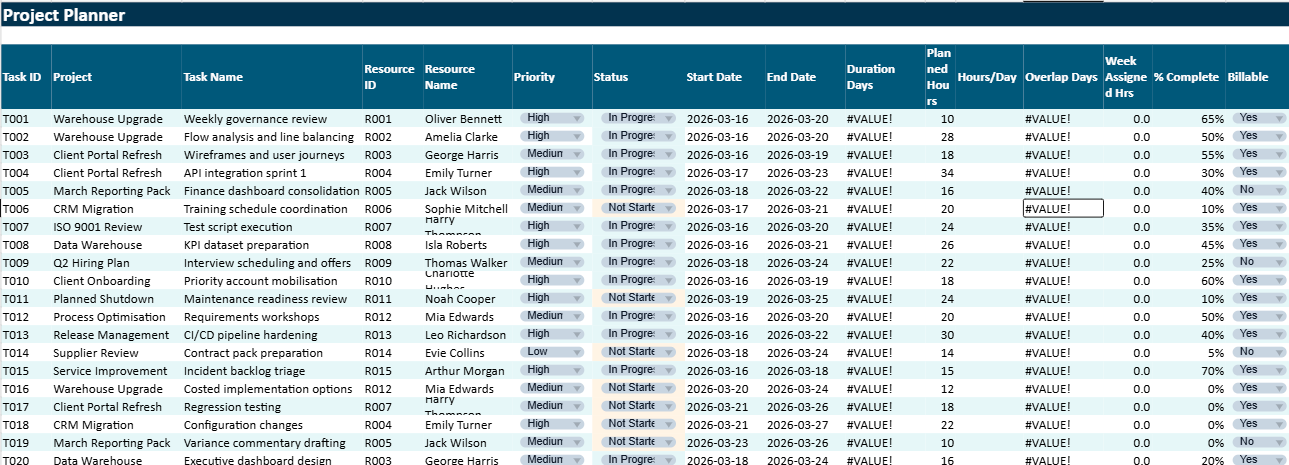
The second section concerns task or project planning. This part often contains project names, task descriptions, start dates, end dates, assigned employees, priority level, expected hours, actual hours, and progress status. This creates the connection between people and workload.
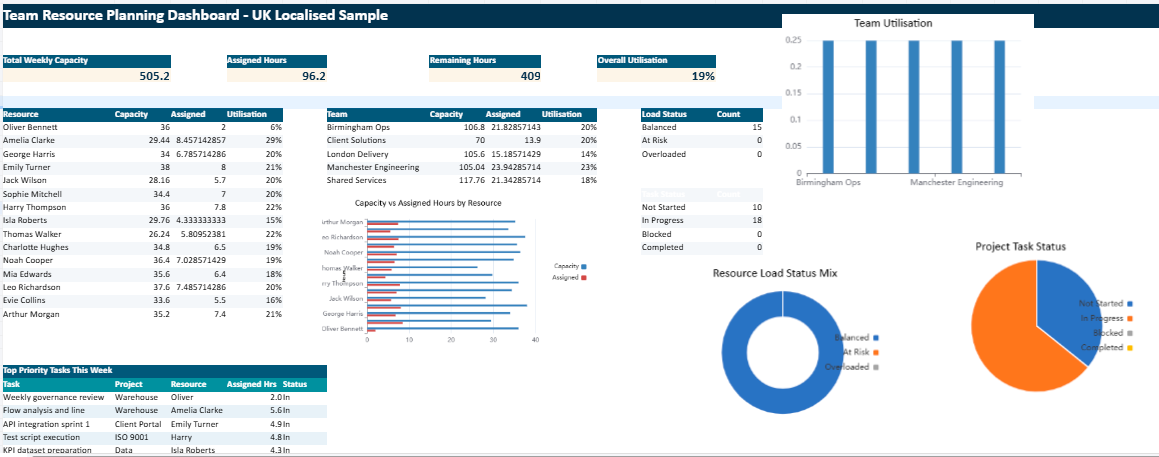
The third section focuses on weekly or monthly visibility, while the fourth usually presents a dashboard that highlights utilisation, available capacity, workload by team member, project distribution, and possible overload risks.
| Template Section | What It Contains | Main Purpose |
|---|
| Team Resources | Names, roles, departments, working hours, skills, availability | Shows who is available and what capacity exists |
| Project Planner | Tasks, start dates, deadlines, assigned staff, planned hours, status | Connects workload with people and timing |
| Weekly View | Weekly allocation, planned hours, visible workload by employee | Makes scheduling pressure easier to identify |
| Dashboard | KPIs, utilisation, team balance, task status, workload charts | Supports faster review and stronger decisions |
The value of planning workload clearly
One of the main benefits of a team resource planning template is clarity. Many workload problems do not come from a lack of effort. They come from a lack of visibility. When managers cannot clearly see who is doing what and how much time has already been committed, planning tends to rely on assumptions instead of facts.
A spreadsheet helps replace that uncertainty with a more structured overview. It shows whether a team member is already close to full capacity, whether a department is unevenly loaded, or whether a project has been assigned enough support to move forward properly. This clarity improves scheduling, communication, and fairness across the team.
Why visual dashboards improve team management
A workbook becomes much more powerful when it includes a dashboard. Managers rarely have time to examine every task row in detail. They often need a quick visual summary that tells them where the planning pressure is rising and where corrective action may be needed.
A dashboard can show utilisation percentages by employee, planned hours versus available hours, project workload by week, open tasks by priority, or workload by department. These visual elements make the planning situation much easier to interpret and much easier to discuss during weekly reviews.
A stronger planning culture starts with visibility
When managers, coordinators, and team members work from the same planning view, conversations become more precise. It becomes easier to rebalance tasks, protect deadlines, and reduce the risk of silent overload.
Practical uses across different teams
A team resource planning template can be used in many professional settings. In a project environment, it helps allocate consultants, analysts, or engineers across multiple assignments. In an HR department, it can support workforce scheduling and absence visibility. In construction or engineering, it can help assign site teams and technical specialists according to project stages and deadlines.
Its usefulness comes from its flexibility. Some teams need daily planning, while others work on a weekly or monthly basis. Some focus on billable hours, while others care more about task volume or internal capacity. Excel allows the template to reflect those differences while staying practical.
The risks of poor resource planning
When resource planning is weak, the consequences can spread quickly. Overloaded employees may struggle to meet deadlines, quality may begin to suffer, and urgent work may keep disrupting the original priorities. At the same time, managers may not notice underused capacity elsewhere in the team.
This creates a double loss. Some people carry too much, while some available potential remains untapped. Over time, this can affect morale, service quality, project delivery, and staff retention. A good planning template helps manage that pressure more intelligently by making the problem visible earlier.
What makes a template truly effective
A workbook becomes effective when it remains clear, practical, and easy to maintain. Too many spreadsheets fail because they are overloaded with unnecessary complexity. If formulas are difficult to understand and the layout is confusing, users stop trusting the file. Once confidence is lost, the spreadsheet becomes a reporting burden rather than a management tool.
A strong template should therefore separate inputs, calculations, and dashboard views clearly. It should use consistent categories, easy formatting, and simple formulas wherever possible. Dropdown lists, status indicators, and colour-coded warnings often improve usability while keeping the workbook easy to manage.