Sales Activity Tracker Excel : Free template
Sales work moves fast. One day brings calls, emails, follow-ups, meetings, reminders, notes, and last-minute updates. In that constant movement, it becomes very easy to lose sight of what really matters. A sales activity tracker in Excel helps bring everything back into focus. It gives structure to daily effort and makes sales work feel more manageable.
That is exactly why this kind of tool remains so useful. It does not try to impress with unnecessary complexity. It helps people work better. A good tracker shows who was contacted, what happened, what comes next, and which opportunities deserve attention first. When the file is clear and well organized, it becomes a daily support tool rather than a document people open only from time to time.
Why sales activity needs to be tracked carefully
Many sales problems do not come from lack of effort. They come from lack of visibility. A salesperson may stay busy all week and still feel unsure about what actually moved forward. A strong prospect may wait too long for a reply. A follow-up may be forgotten. A meeting may happen, yet the outcome may never be recorded properly.
That is where tracking becomes valuable. It gives shape to the work. Instead of carrying everything mentally, the salesperson can rely on a clear record. This reduces stress and improves consistency. It also creates a stronger sense of direction because each action connects to a broader commercial objective.
Tracking also helps at team level. A manager can understand activity more easily, identify where momentum is strong, and spot where support is needed. The benefit is not only administrative. It is deeply practical.
What a sales activity tracker in Excel usually contains
A useful sales activity tracker includes the information people actually need in real working conditions. That often means the date of the activity, the contact name, the company, the type of action completed, the deal stage, the priority level, the expected value, the next step, and a short notes section.
These fields may look simple, yet together they tell the story of the pipeline. They show what has already been done and what should happen next. This makes the file more than a spreadsheet. It becomes a live map of commercial effort.
The strongest templates also stay easy to read. Dropdown lists, clean headers, and a few visual cues make the file much more comfortable to use. That detail matters because a tool only creates value when people genuinely want to open it and update it.
Why Excel still works so well for sales tracking
Excel stays popular for a very simple reason: it is flexible, familiar, and fast. Most people already know how to use it. That makes adoption easier, especially for small teams, independent professionals, and companies that want a practical solution without technical barriers.
Another advantage comes from its freedom. In Excel, users can sort data, filter priorities, adjust columns, and personalize the file according to their way of working. This flexibility gives the tracker a very natural feel. It adapts to the business instead of forcing the business to adapt to the tool.
Even in companies that already use a CRM, Excel often keeps a useful place. It can support a personal pipeline, a specific campaign, a temporary lead list, or a short-term follow-up plan. That is why it remains relevant. It is direct and dependable.
The strength of a one-page view
A one-page sales activity tracker offers something very valuable: immediate clarity. Everything important appears in one space. That means less time spent navigating and more time spent acting. Before starting the day, a salesperson can open the file and understand the situation almost instantly. Which leads need attention today? Which follow-ups are overdue? Which opportunities are close to moving? A one-page layout answers these questions quickly.
This also makes the file more useful during meetings. A manager can review the dashboard without asking for long explanations. The conversation becomes sharper because the information is already visible. Good design supports good decisions.
Why KPI blocks make the tracker more useful
When KPI blocks appear at the top of the file, the spreadsheet becomes much more powerful. It stops being just a list of activities and starts acting like a mini dashboard. Metrics such as total leads, meetings booked, proposals sent, deals won, conversion rate, and pipeline value provide a fast summary of performance.
That overview changes the way people read the file. They do not only see actions. They see direction. If activity is high yet results stay low, the team knows something needs to be adjusted. If the number of meetings rises and proposals follow, momentum becomes easier to confirm.
A few simple KPIs can therefore create a much stronger reading of what is happening commercially. That makes the tracker more useful for both execution and review.
How a tracker supports better daily habits
The real power of a sales tracker often comes from the habits it encourages. It invites the user to update information regularly, define the next action clearly, and keep the sales process moving. This rhythm creates structure in a job that can otherwise feel scattered.
A salesperson who updates the file after each interaction usually works with more confidence. Nothing important stays floating in memory. Every conversation leaves a trace. Every next step becomes visible. That makes follow-up more reliable and reduces the risk of missing good opportunities.
This habit also helps at the end of the week. Instead of trying to remember everything that happened, the salesperson already has a clear record of activity. Reporting becomes easier. Planning becomes easier too.
Why deal stages matter
Not every opportunity sits at the same point in the sales journey. Some leads are brand new. Others are already qualified. Some are close to proposal stage, while others are still in conversation. A good tracker reflects this progression clearly.
When deal stages are visible, the pipeline becomes easier to understand. It is no longer just a list of names. It becomes a sequence of opportunities at different levels of maturity. This helps the salesperson prioritize more intelligently and helps the manager assess pipeline quality with more precision.
Deal stages also make forecasting more realistic. A lead that has just been contacted does not carry the same weight as an opportunity already in negotiation. A tracker that shows those distinctions gives a much truer picture of commercial reality.
The importance of prioritization
One of the most common mistakes in sales comes from treating every opportunity the same way. In real life, that approach rarely works well. Some prospects deserve immediate energy because they show strong intent, real need, or high value. Others can wait a little longer without harming the pipeline.
That is why priority levels matter. A tracker that classifies leads as high, medium, or low priority helps the salesperson focus attention where it will matter most. This improves time management and often improves results as well.
Prioritization brings calm into sales work. Instead of trying to do everything at once, the user can move through the file with clearer judgment. That alone makes the day more productive.
Why follow-up is often the real difference
A great number of sales opportunities are lost for a very ordinary reason: the follow-up was weak, late, or forgotten. The first contact may go well, yet without a proper next step, interest cools down. Momentum disappears quietly.
A sales activity tracker helps prevent that. It makes follow-up visible. Each contact can have a planned next action, a date, and a short reminder of what matters in the conversation. This keeps relationships warm and commercial movement steady.
Good follow-up also leaves a strong impression. Prospects notice when communication feels organized and attentive. They feel the difference between random outreach and thoughtful continuity. A tracker helps create that continuity.
Tracking activity types creates better insight
Another useful feature of a sales activity tracker is the ability to record the type of action completed. Calls, emails, meetings, demos, proposals, and check-ins each play a different role in the sales process. When these actions are tracked clearly, the team starts learning from them.
Patterns often appear over time. Some salespeople may see that calls open more doors than emails. Others may notice that demos create momentum more effectively than long written exchanges. These observations help refine strategy and improve efficiency.
This is where the tracker becomes more than an organizational tool. It becomes a learning tool. It shows not only what happened, but also which actions seem to produce the strongest results.
Common mistakes that reduce the value of the tracker
Some sales trackers fail because they try to do too much. They include too many fields, too many categories, or too many decorative elements. As a result, the file becomes heavy and annoying to maintain. People stop updating it properly, and its reliability fades.
Other trackers fail because they are too thin. They may list names and dates, yet offer very little help when it comes to real decision-making. In that case, the tool exists, but it does not truly support the work.
The best trackers find the right balance. They stay simple enough for daily use and rich enough to guide action. That balance is what makes the file genuinely helpful.
How to use the tracker in a smarter way
The most effective approach is to treat the tracker as a working companion throughout the week. Add new contacts quickly. Update the stage after each important exchange. Write short, useful notes. Set the next step immediately instead of planning to do it later.
A regular review routine also helps. On Monday, the user can scan the week’s priorities. Midweek, it becomes useful to revisit stalled opportunities. At the end of the week, the file can be cleaned up, updated, and prepared for the next cycle.
This does not require a lot of time. A few disciplined minutes can save hours of confusion later. That is one of the quiet strengths of a good Excel tracker.
Why design really matters
- People often think design is secondary in a spreadsheet. In reality, design changes the user experience a great deal. A clean, elegant layout makes the file easier to read and more pleasant to use. Better spacing, clear headers, refined colors, and visible KPI blocks reduce friction.
- That comfort matters more than it may seem. When a tool feels polished, people tend to use it more consistently. In sales, consistency is everything. A beautiful tracker will not close deals by itself, yet it can absolutely support better discipline and better adoption.
- A premium design therefore serves a practical purpose. It turns the file into something people want to keep open, update, and rely on.
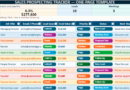
- Sales Activity Tracker Excel – One-Page Executive Dashboard
Sales Activity Tracker Excel – One-Page Executive Dashboard
This Excel file is designed to help sales professionals track daily activity, monitor deal progress, plan follow-ups, and review key sales indicators in one clear and elegant dashboard. It combines operational tracking with quick performance visibility, which makes it useful for both individual salespeople and managers.
User guide
- Enter sales activity details
Fill in each row with the date, contact name, company, activity type, deal stage, priority, owner, value, next step, and notes. - Update the file after each interaction
Record calls, emails, meetings, proposals, and follow-ups regularly to keep the tracker accurate. - Review deal stages
Use the stage column to follow the progress of each opportunity from first contact to closed deal. - Focus on priorities
Check high-priority opportunities first and review the next action column to stay consistent in follow-up. - Use the KPI section at the top
Monitor the main indicators such as total leads, meetings, proposals, closed deals, conversion rate, and pipeline value. - Review the dashboard weekly
Use the file at the beginning and end of the week to track progress, adjust priorities, and prepare the next actions.
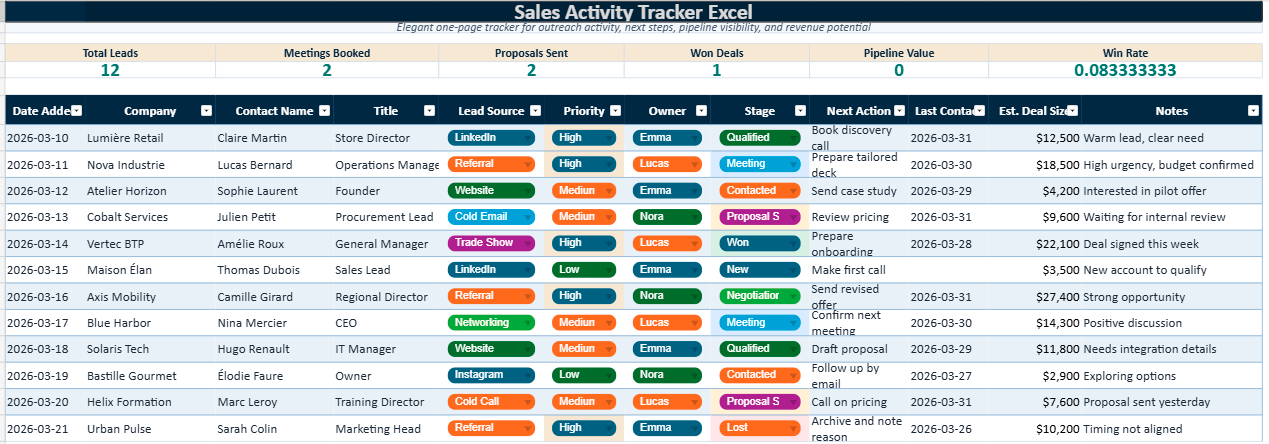
How to Keep Track of Sales in Excel
Keeping track of sales in Excel works best when the file stays clear, consistent, and easy to update. A good spreadsheet should help you record every important sales action, monitor deal progress, schedule follow-ups, and review performance without wasting time. The goal is simple: turn everyday activity into a visible sales process that you can manage with confidence.
1. Create a clear structure
Use columns for the date, client name, company, sales activity, stage, priority, deal value, next step, and notes. A clean structure makes the file easier to read and easier to update.
2. Track every interaction
Record calls, emails, meetings, demos, and proposals as they happen. This creates a reliable history and helps you understand how each opportunity is moving.
3. Use deal stages
Assign each lead a stage such as new, contacted, qualified, proposal sent, negotiation, or closed. This makes the pipeline easier to understand at a glance.
4. Plan the next action
Add a next follow-up date and a short action note for every active opportunity. This keeps momentum alive and reduces the risk of missed follow-ups.
Best practices for a useful sales tracker
- update the spreadsheet right after each meaningful interaction;
- keep stage names simple and consistent across the file;
- highlight high-priority opportunities clearly;
- review the tracker at least once a week;
- add KPI blocks at the top for leads, meetings, proposals, deals, and pipeline value.
Why Excel still works
Excel remains popular because it is flexible, familiar, and fast to adapt. A well-designed sales tracker can support daily follow-up, reporting, and pipeline review without the weight of a complex system.
A strong Excel sales tracker does not need to be complicated. It needs to be readable, updated regularly, and built around the actions that truly move deals forward.