
Visitor Log Sign-In Sheet in Excel: Why They Are Important Beyond Just Formality
Download Visitor Log Sign-In Sheet in Excel ⬇️
Enter any secure facility — an office building, a warehouse, a government agency — and you’ll probably find a sign-in sheet waiting for you at the front desk. It may appear, upon first inspection, a mere formality. A clipboard with a few lines, some sort of tablet with names cycling across the screen. But behind that simplicity is something much more deliberate — a performance that helps companies remain secure, accountable and in control of who is coming and going.
The visitor log sign-in sheet is more than just a record of attendance. It’s a sleeping workhorse in your overall security posture. When used judiciously, it adds a layer of clarity and oversight to each day’s operations that is all too easy to take for granted — until something goes wrong.
Why Track Visitors at All?
Let’s begin with the most basic question: Why does it matter?
Whenever someone from outside your core team comes in full time, they bring a set of variables you haven’t been dealing with. They might be a service technician, someone being interviewed for a job, a vendor dropping off an order, a potential client. Every visitor has a purpose, a schedule to meet, and a set of spaces you’re supposed to be shepherding.
Without some level of traceability, the most well-meaning visitors can accidentally disrupt workflows or even, in some rare occasions, pose a risk to people or information. This could be something as simple as checking visitors in and out in a log. It provides a snapshot of who’s inside your building, when they got there, why they’re visiting and even whether they’ve left the premises.
It’s not about mistrust. It’s the flexibility, stupid — and flexibility is what’s going to distinguish reactive operators from proactive ones.
A Solution That Mixes the Practical with the Professional
A good sign-in sheet for visitors does more than simply collect names. It is a signal: out here we’re organized and safe, and we respect the course of our space.
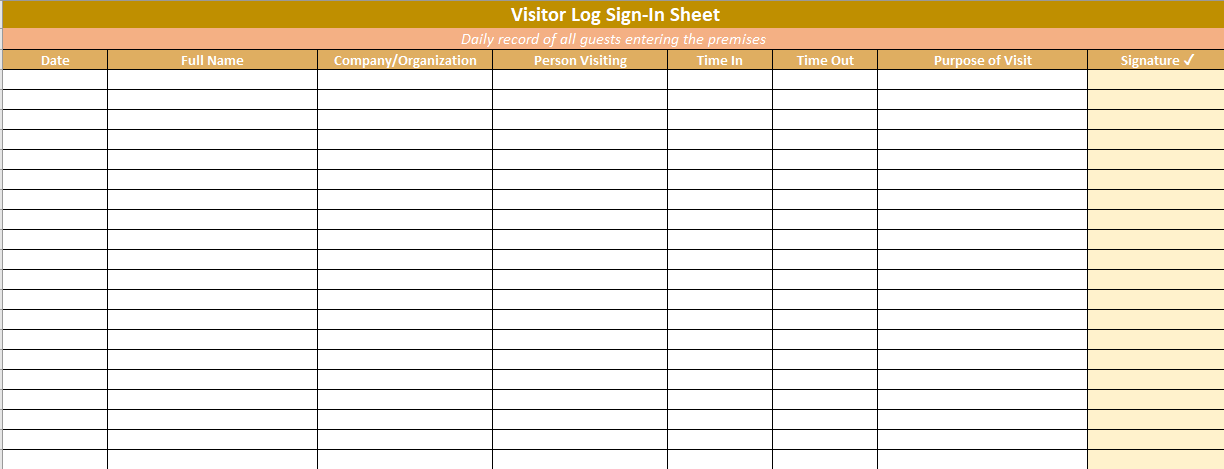
The best visitor log is simple to complete, well-organized and specifically tailored for your environment. We might mean by that something like:
- Full name
- Company or affiliation
- Whom they’re meeting
- Purpose of visit
- Time in and time out
- Signature for accountability
That may sound like a lot of data, but it has multiple uses. It protects the company from liability, guarantees the visitors are anticipated and documented, and brings home safety protocols — particularly important in workplaces where there are restricted areas or sensitive data.
Making It Human-Friendly
After you’ve found your email and password and clicked “Sign in,” it’s where many sign-in flows go off the rails: they’re either too bureaucratic or too casual. A clipboard with smudge marks and no privacy? Not great. A sign-in tablet with a confusing interface and no instructions? Just as bad.
The trick is to design something functional yet not intimidating. A good visitor log sheet includes clear headings, space to write, and a flow that doesn’t stall folks out. It’s also visually clean — structured for respectability but not so rigid it feels like airport security.
And we mustn’t forget the receptionist, if there is one. They are the unsung heroes in this whole process. Give them a tool that serves them, not one that creates an additional layer of friction in their already-juggling day.
Real-World Scenarios Where It Matters
There are moments in life when you don’t really appreciate the worth of visitor tracking until it has to be checked retrospectively. Some of these are just a few places where a sign-in sheet can come in particularly handy:
- After-hours access: You must confirm who was in the building on a holiday or weekend.
- Incident investigation: There’s a security violation or minor equipment problem. Who was on the premises that day becomes critical.
- Compliance audits: In certain industries — healthcare or finance for example — regulators might require visitor logs as part of physical security requirements.
- Emergency evacuations: In the event of a fire drill — or worse, an actual emergency — a visitor list can help you confirm that all the visitors have gotten out safely.
These moments are rare. But when they occur, that confessor is more than a useful friend to have. It becomes a point of truth.
Paper or Digital? Depends on Your Context
There’s no one-size-fits-all here. Paper log sheets have their place — even in less-trafficked spots or places where internet-connected systems aren’t viable. They are easy to apply, don’t need any technical setup, and can be archived for records.
Digital tools, however, come with automation and real-time oversight. You can create alerts, take photos, save data without the concern of unclear handwriting. The decision depends on the needs and traffic demands of your site, and how comfortable your team feels with the technology.
A hybrid model is sometimes the better fit for most people: a printout Excel sign-in sheet for everyday purposes, alongside a digital system in high-security zones or sensitive regions.
A Tiny Step, but a Mighty One
Well, let’s be straight: visitor tracking doesn’t sound like the sexiest part of the old if-it-moves-measure-it game. No one is thrilled about a sign-in sheet. But in practice, it’s a sign of discipline. It communicates to your staff, his partners, even his visitors that the organization has taken its people, its space, and its processes seriously.
And sometimes, all it takes to raise the bar is raising the bar.
You don’t have to have a highfalutin system and expensive software. Begin with an intelligent layout, train your desk team, and bake it into daily routine. Keep it consistent. And ensure someone is in charge of reading the responses, even if only glancingly.
For the next time you just have to know who was there, when, and why — you’ll be really glad you didn’t trust it to memory.
Designing a Sign-In Process That Works in the Real World
Understanding the value of a visitor log sign-in sheet is the first step. The next? Building one that people will actually use — and use properly.
Let’s face it: if a system is annoying, awkward, or confusing, it won’t be followed. That applies to everything from security protocols to coffee machine instructions. A visitor sign-in process is no exception.
So how do you make one that sticks? Here’s a simple framework to help.
1. Start with What You Actually Need to Know
Not every workplace requires a 12-field form. In fact, over-collecting information can be a barrier to compliance. Before you design your sheet or digital tool, take a moment to think:
- What information is critical for security?
- What is required for compliance?
- What’s helpful for operations?
For most workplaces, the essentials include name, date, company (if relevant), purpose, time in/out, and the host’s name. That’s usually enough to cover your bases without creating a bottleneck.
2. Choose a Format That Matches Your Environment
Some sites are fast-moving. Others are quiet but deal with highly sensitive information. Match your method to the pace and purpose of the space:
- Paper logs are ideal for small offices, construction sites, or places without network infrastructure.
- Digital systems are useful in reception-heavy buildings or corporate campuses where automation and audit trails matter.
- Hybrid models — where digital records are backed up by simple printed sheets — strike a practical balance.
What matters most is that the format fits the flow of the day. Don’t force technology where pen and paper work just fine. And don’t settle for messy clipboards when precision is key.
3. Train the People Who Make It Work
This part is often overlooked. You can have the best-designed form in the world, but if the front desk team or security staff aren’t briefed on why it matters, the system breaks down quickly.
Train them on:
- How to guide a visitor through the process.
- What to do if someone refuses to sign.
- When to escalate something that doesn’t feel right.
- Where to store or archive completed logs.
A well-informed person at the entry point can turn a simple form into a meaningful moment of assurance — both for the organization and for the visitor.
4. Review, Don’t Just Record
Visitor logs should not become a black hole. Set a rhythm for someone — whether it’s facilities, security, or admin — to review the logs weekly or monthly.
Look for:
- Repeated names you didn’t expect
- Visits outside of normal hours
- Missing time-outs or signatures
- Patterns that suggest process gaps
This step doesn’t need to be labor-intensive. A five-minute review every Friday can go a long way in spotting potential issues before they escalate.
5. Build It into the Culture
When a visitor sign-in feels normal — not an exception, not an afterthought — it becomes part of the fabric of your workplace.
You know you’ve done it right when:
- People pause instinctively at the sign-in desk
- Visitors ask to sign, instead of being told
- Team members understand its purpose without a reminder
That kind of culture doesn’t happen overnight, but it’s entirely within reach. Start by treating the process with respect. Explain the “why.” And model the behavior from the top down.
What Comes Next?
If you haven’t formalized your visitor tracking yet, now’s a good time to start. You don’t need a big budget or a tech overhaul. You just need:
- A clear layout
- A designated process owner
- A few minutes of training
- And a commitment to consistency
From there, everything else — compliance, preparedness, professionalism — follows.
Because the truth is, security doesn’t have to be loud to be effective. Sometimes, it’s a quiet form at the front desk that does more than we give it credit for.