
How to design an effective Customer New Client Survey – Word template & examples
Building Relationships
The best way to build up relationships is to get the right information early in the sales process from account setup and beyond.
“At My2ndGig.com we have developed the New Client Survey Form as our cornerstone for this effort. In consulting, design, marketing, finance and every other industry where you rent yourself to service-based businesses, a good client intake survey can not only save you and your team valuable time — it can also reveal valuable truths that you might otherwise never hear.”
In this post, we will discuss why a new client survey is essential, what questions to ask, and we’ll provide you with a terrific blank template which you can modify for your firm.
Why a New Client Survey?
A new survey for clients can:
- Get to know your client’s objectives, problems and wants
- Set the terms of work or the relationship
- Begin with well-defined expectations
- Get organised faster by consolidating important details in one place
- Build trust and professionalism
It also reduces misunderstandings and increases project alignment.
📋 What To Include In A New Client Survey
The sections will differ according to the nature of your industry, but generally, a good survey will contain the following sections:
Basic Information
- Client name
- Company name
- Contact details
- Preferred communication method
Business Overview
- Brief description of the company/organization
- Mission or vision statement
- Primary services or products offered
- Key stakeholders for this project
Goals & Objectives
- What is your goal with our service?
- What does success look like?
- Any goals you are trying to reach (e.g. short and/or long term)?
Challenges or Pain Points
- What are some of your biggest challenges right now?
- Have you dealt with other providers like this? What went well or poorly?
Timeline & Budget
- Ideal start date and deadlines
- Estimated budget or pricing expectations
- Urgency of the project
Preferences & Style
- Tone of communication (formal/informal)
- Design/brand guidelines (if any)
- Preference for collaboration or approvals
Additional Notes
- Anything else we should know?
- How did you hear about us?
Sample Template: New Client Survey (Editable)
Here is their template – you can copy/paste it out or tailor it to onboarding process:
New Client Survey Form
Contact Information
Name:
Company:
Email:
Phone:
Contact Preference (Email/Phone/Other):
Company Overview
Brief Description of Your Business:
Industry:
Website / Social Media:
Project Goals
What is the goal of this collaboration?
What are your top 3 goals?
Challenges
What are some of the challenges you are facing?
Have you worked with suppliers like us in the past? If yes, what worked well or didn’t?
Timeline & Budget
Desired start date:
Target deadline:
Estimated budget range (optional):
Communication & Collaboration
How much do you want to participate in the process?
Some particular tools or applications you use?
Brand or Style Preferences
Do you already have branding materials or a brand style?
Preferred tone (professional, friendly, bold, etc.):
Final Thoughts
Is there anything you’d like us to know before we begin?
How did you hear about us?
📎 Tips for Using the Survey
- Use an online form creation platform like Google Forms, Typeform or Jotform to ensure it’s easy to fill out.
- Send the sheet before the initial official meeting so that you have time to prepare.
- Keep your survey up to date based on customer feedback and changing requirements.
A Considerate Client Survey Is More Than Just Paperwork
It’s a strategic tool that should inform the nature of the relationship, one that you hope will be productive and efficient. Tailor your form to your business model, and don’t be afraid to ask those tough questions on the front end.
⬇️
Welcome Survey for New Clients

⬇️
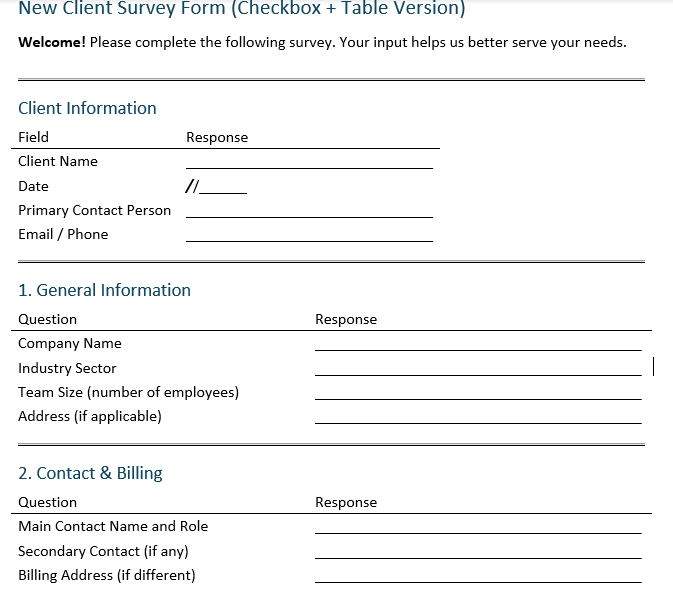
The New Client Survey Form (Checkbox + Table Version) is a structured and professional document designed to gather essential information from new clients during onboarding. Here’s a breakdown of its structure and purpose:
🔹 Purpose
To streamline client intake by collecting:
- Business details
- Project goals
- Expectations
- Technical environment
- Budget and deadlines
- Communication preferences
- Legal consents
🔹 Structure & Features
The form includes tables and checkboxes to ensure clarity, consistency, and ease of completion.
Sections Overview:
- Client Information
Collects basic contact data like client name, date, email, and phone. - General Information
Captures company name, industry, team size, and address. - Contact & Billing
Identifies key people and billing address. - Goals & Challenges
Asks about objectives, challenges, reasons for choosing the provider, and past experiences. - Priorities
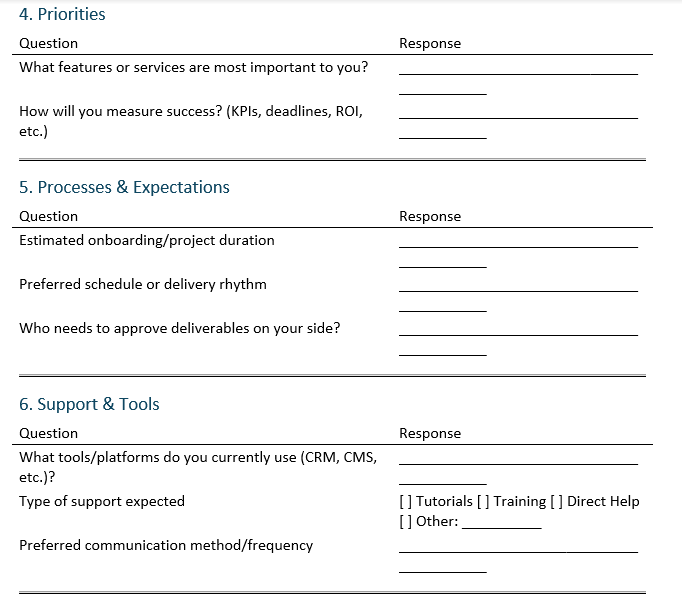
Focuses on priority features/services and success metrics (e.g., KPIs, ROI). - Processes & Expectations
Inquires about project timeline, delivery cadence, and validation workflows. - Support & Tools
Lists platforms used and expected support types via checkboxes (tutorials, training, direct help, etc.). - Budget & Deadlines
Captures budget estimates and key time constraints or events. - Feedback & Suggestions
Allows the client to rate pre-engagement experience and give recommendations. - Consent Section
Includes checkboxes for GDPR-style data use and communication preferences.
✅ Advantages
- Professional layout: Tables provide visual alignment and ease of reading.
- Interactive elements: Checkboxes simplify data entry.
- Adaptability: Can be printed, digitized, or used as a fillable Word/PDF form.
New Client Needs Assessment Form
Optimizing Client Onboarding with a Structured Survey Form
Client onboarding is a critical yet often underestimated phase in the service provider–client relationship. It sets the foundation for collaboration, defines expectations, and prevents misunderstandings that could derail a project. One of the most effective tools to structure this phase is the New Client Survey Form—a document that centralizes the right information from the start.
Why a Formal Survey Form?
Verbal briefings and scattered email exchanges often lead to misaligned objectives and forgotten details. By contrast, a well-structured onboarding questionnaire standardizes the information-gathering process. It encourages clarity, saves time, and ensures all departments (sales, project delivery, legal, billing) have access to the same accurate data.
Key Sections that Add Strategic Value
A comprehensive survey form typically includes the following components:
1. Client Identity and Contact Chain
Collecting the client’s name, contact person, billing information, and team structure prevents administrative delays and confusion in communications.
2. Business Context
Understanding the client’s industry, team size, and existing tools (e.g., CRM, ERP, CMS) enables the service provider to tailor solutions with greater accuracy.
3. Objectives and Challenges
Capturing the client’s goals and pain points clarifies the scope of intervention and reveals underlying needs, even those not explicitly expressed during sales conversations.
4. Project Expectations and Constraints
Asking about project timelines, approval workflows, and key deliverables helps both parties align operationally and avoid mid-project course corrections.
5. Technical and Support Preferences
Identifying preferred communication channels, support formats, and tool integrations enhances the customer experience and supports change management on the client side.
6. Budget and Milestones
Securing early clarity on budget range and critical deadlines creates financial transparency and allows for realistic planning.
7. Legal and Privacy Considerations
Including a consent section ensures compliance with privacy regulations (notably GDPR), which is crucial when handling personal or organizational data.
Benefits for the Service Provider
- Operational Efficiency: Teams save time and reduce back-and-forth by working from a standardized document.
- Risk Mitigation: Documented expectations reduce the likelihood of disputes and legal misunderstandings.
- Stronger Relationships: Clients feel heard and valued when their context is clearly understood and integrated into the service design.
- Scalability: A repeatable intake process supports organizational growth without losing personalization.
Digital or Paper-Based?
While a paper form may suffice for some industries, digital versions with interactive fields (fillable Word/PDF, online forms) enable easier completion, automated workflows, and better data tracking. Tools like Microsoft Forms, JotForm, Typeform, or Google Forms can be synced with CRMs or project tools for immediate follow-up.