
Automated Maintenance Plan in Excel: Gantt Charts, KPIs, and Full Automation
Recommandés




Download a Maintenance Plan in Excel: Gantt Charts, KPIs, and Full Automation ⬇️
Maintaining equipment in optimal working order requires diligent upkeep to minimize disruptions and costs. A meticulously designed maintenance schedule is paramount to such efforts.
While dedicated software caters to organizational needs, Microsoft Excel affords flexibility, customization and affordability when developing individualized maintenance regimes.
This guide outlines how to engineer a self-sustaining maintenance regimen within Excel incorporating automated reminders for: timely inspections; routine repairs and replacements; performance evaluations; and record-keeping for parts, personnel and preventative measures. Adherence to the structured system will help guarantee infrastructure and sustainability for production.
- Centralized asset registers
- Preventive maintenance scheduling
- Work order tracking
- Spare parts inventory
- KPI dashboards
- Dynamic Gantt charts
This setup transforms Excel from a simple spreadsheet tool into a powerful CMMS-like solution.
1. Structure of the Maintenance Plan Workbook
A complete maintenance plan in Excel should be divided into functional sheets. In our automated version, the workbook includes:
1.1 README (Instructions)
A front-page guide that explains:
- How to enter data
- How the automation works
- Where to update drop-down lists
- How to interpret KPIs and Gantt charts
1.2 Lists (Reference Data)
A centralized sheet storing:
- Equipment categories
- Locations
- Maintenance strategies
- Work order priorities
- Staff or contractors (responsible persons)
- Vendors
- Units of measurement
These lists feed drop-down menus in other sheets via data validation, ensuring consistent, error-free data entry.
2. Core Data Sheets
These sheets are where most of the daily data entry and tracking happens.
2.1 Assets Register
- Fields: Asset ID, Name, Category, Location, Criticality, Condition, Installation Date, Warranty End Date, Manufacturer, Model, Serial Number, Maintenance Strategy, MTBF, MTTR, Notes.
- Automation: Drop-downs for category/location/condition/strategy; automatically integrated with PM scheduling and work orders.
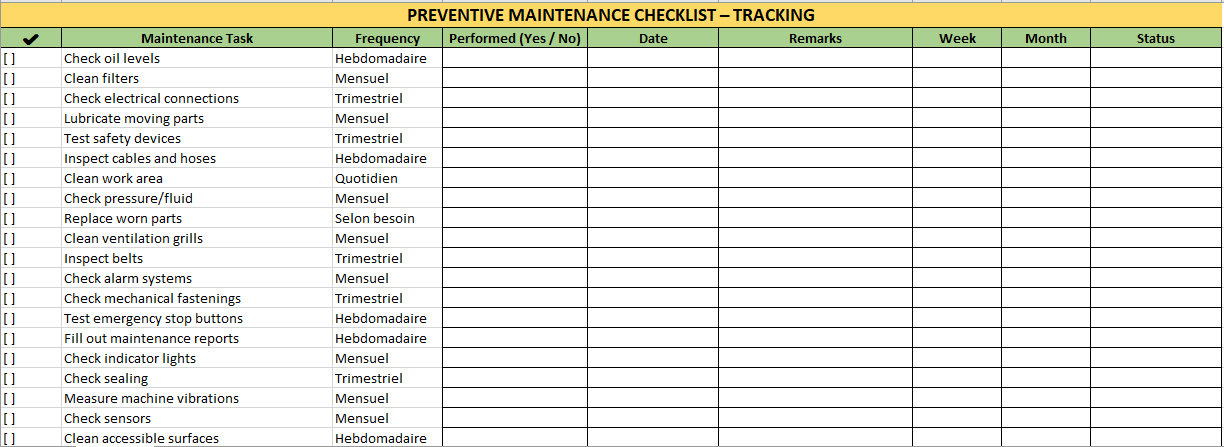
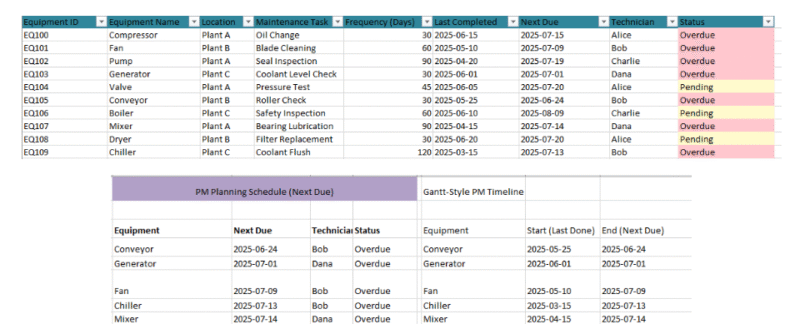
2.2 Preventive Maintenance (PM_Tasks)
- Fields: Task ID, Asset ID, Task Name, Frequency (days), Last Done Date, Next Due Date, Responsible, Estimated Hours, Procedure, Safety Checks.
- Automation:
Next Dueauto-calculated based onLast Done + Frequency.- Conditional formatting highlights overdue tasks in red and tasks due today in yellow.
2.3 Work Order Log (WO_Log)
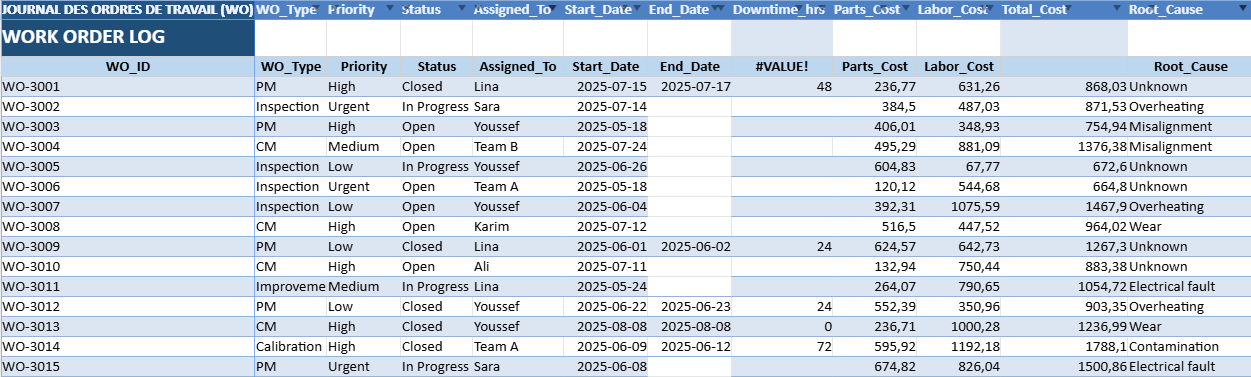
- Fields: WO ID, Dates (Opened, Start, End), Type, Priority, Status, Assigned To, Downtime (hrs), Parts Cost, Labor Cost, Total Cost, Root Cause.
- Automation:
- Downtime and Total Cost auto-calculated.
- Conditional formatting for urgent open work orders.
- Helper columns calculate Lead Time (days) and SLA compliance.
2.4 Spare Parts Inventory
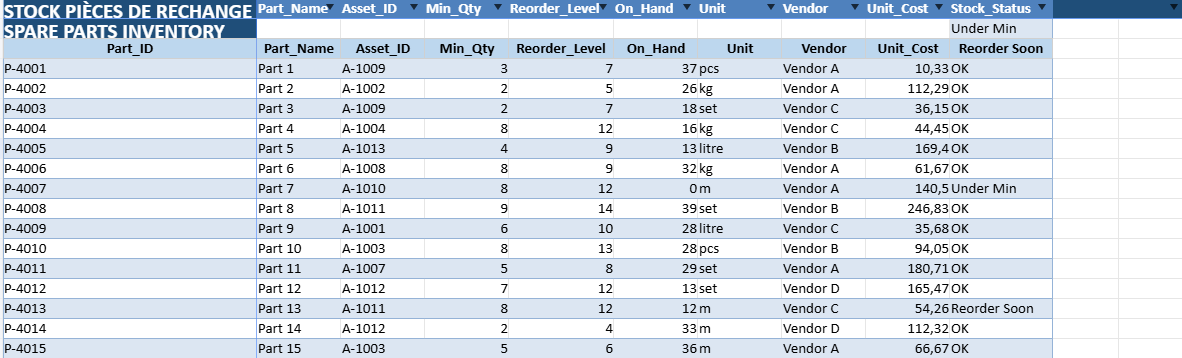
- Fields: Part ID, Name, Associated Asset, Minimum Quantity, Reorder Level, On-hand Stock, Unit, Vendor, Unit Cost, Stock Status.
- Automation:
- Stock status auto-classified as OK, Reorder Soon, or Under Min.
- Conditional formatting highlights stock issues.
3. KPI Dashboard
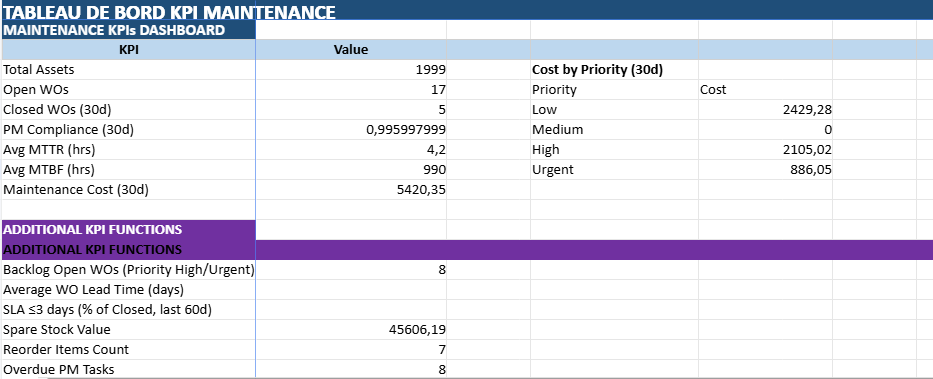
The KPI sheet aggregates data from all other sheets to monitor:
- Total number of assets
- Open and closed work orders
- PM compliance rate
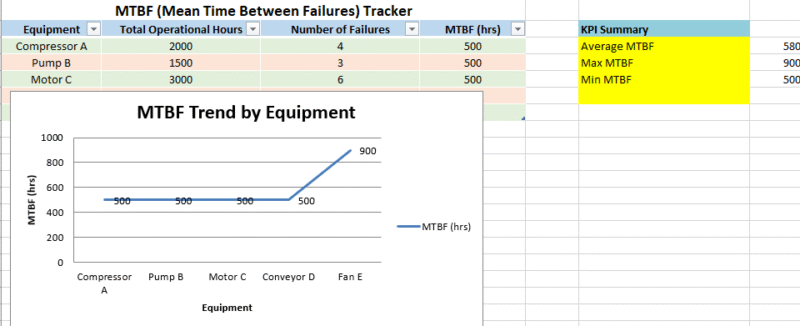
- Average MTTR and MTBF
- Maintenance costs in the last 30 days
- Backlog of high-priority WOs
- Spare parts stock value
- Overdue PM tasks
3.1 KPI Automation
Using Excel’s COUNTIFS, SUMIFS, and AVERAGEIF functions, the dashboard updates automatically as soon as new data is entered.
No manual recalculations are required.
4. Gantt Charts for Planning
Gantt charts offer a visual view of upcoming tasks.
4.1 Types of Gantt Charts
- Gantt_WO: Displays work orders over a 60-day horizon, color-coded by priority.
- Gantt_PM: Shows preventive maintenance tasks on their due dates.
- Gantt_Combined: Integrates PM and WO in one timeline for holistic planning.
4.2 Benefits
- Immediate visibility of workload
- Easy identification of overlapping tasks
- Priority-based color coding for urgency
5. Key Benefits of an Excel Maintenance Plan
- Cost-Effective: No expensive CMMS license required.
- Customizable: Modify fields, colors, and formulas to match your workflow.
- User-Friendly: Excel is widely known and accessible to most staff.
- Automation Without VBA: All formulas are native Excel functions for portability.
6. Implementation Tips
- Keep Lists Updated: Regularly update the Lists sheet to maintain data consistency.
- Validate Data Entry: Use drop-down menus wherever possible.
- Highlight Deadlines: Rely on conditional formatting for overdue tasks and low stock.
- Schedule Reviews: Review the KPI dashboard weekly or monthly.
- Backup the File: Store versions in a shared drive or cloud service.
That is where an elaborate Excel-based automation maintenance creates the divide between simple spreadsheets and complete CMMS platforms. This gives you control, visibility, and productivity while never even having to leave Excel: with structured data entry, automation plus visual tools like Gantt charts. Thus your maintenance team can plan work, track progress and optimize real-time insights and definitive timing with this setup.
1. README
Purpose: Quick user guide.
- Contains instructions on how to fill in data, update lists, and interpret dashboards.
- Explains the workflow: update lists → log assets → define PM tasks → track work orders → monitor KPIs.
- Merged title cell with bold white text on dark blue background.
- Bulleted steps for clarity.
2. Lists
Purpose: Stores all drop-down values to keep data entry consistent.
- Columns: Categories, Locations, Conditions, Priorities, WO Status, WO Type, Responsibles, Vendors, Maintenance Strategy, Spare Units.
- Each column holds multiple predefined values (e.g., Priorities = Low, Medium, High, Urgent).
- This sheet feeds data validation lists in other sheets.
- Blue header row, bold font, and filters enabled.
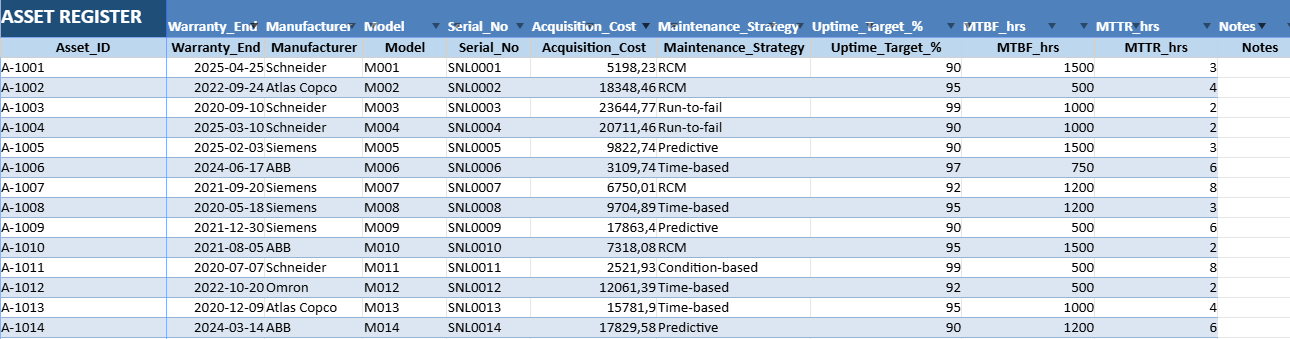
3. Assets
Purpose: Centralized register of all equipment.
- Columns: Asset_ID, Asset_Name, Category, Location, Criticality (1–5), Condition, Install Date, Warranty End, Manufacturer, Model, Serial No, Acquisition Cost, Maintenance Strategy, Uptime Target %, MTBF, MTTR, Notes.
- Automation: Drop-downs for category/location/condition/strategy; all values linked to Lists sheet.
- Formatting: Blue headers, filters, table style with alternating row colors.
- Data integrated with PM_Tasks, WO_Log, and Spare_Parts.

4. PM_Tasks (Preventive Maintenance)
Purpose: Schedule and track preventive maintenance.
- Columns: Task_ID, Asset_ID, Task_Name, Frequency_Days, Last_Done, Next_Due (auto), Responsible, Estimated Hours, Procedure, Safety Checks.
- Automation:
Next_Duecalculated automatically:=IF(AND(E…<>"",D…<>""),E…+D…,"").- Conditional formatting:
- Overdue tasks in red
- Tasks due today in yellow
- Drop-downs for Asset_ID and Responsible.
5. WO_Log (Work Orders)
Purpose: Track corrective and preventive work orders.
- Columns: WO_ID, Opened_Date, Asset_ID, WO_Type, Priority, Status, Assigned_To, Start_Date, End_Date, Downtime_hrs (auto), Parts_Cost, Labor_Cost, Total_Cost (auto), Root_Cause, Comments, Lead_Time_Days (auto), SLA_3d (auto).
- Automation:
- Downtime formula:
=IF(AND(H…<>"",I…<>""),(I…-H…)*24,""). - Total cost formula:
=IF(AND(K…<>"",L…<>""),K…+L…,""). - Lead time in days for SLA tracking.
- SLA_3d = 1 if closed ≤ 3 days.
- Downtime formula:
- Conditional formatting highlights urgent open WOs.
6. Spare_Parts
Purpose: Inventory of maintenance parts.
- Columns: Part_ID, Part_Name, Asset_ID, Min_Qty, Reorder_Level, On_Hand, Unit, Vendor, Unit_Cost, Stock_Status (auto).
- Automation:
- Stock status:
=IF(F<=D,"Under Min",IF(F<=E,"Reorder Soon","OK")). - Conditional formatting:
- Red for “Under Min”
- Yellow for “Reorder Soon”
- Stock status:
- Drop-downs for Asset_ID, Unit, and Vendor.
7. Vendors
Purpose: Vendor contact information.
- Columns: Vendor, Contact_Name, Email, Phone, Lead_Time_Days, Notes.
- Pre-filled with example vendors.
- Table formatting with filters.
8. KPIs
Purpose: Real-time maintenance performance dashboard.
- Metrics:
- Total assets
- Open WOs
- Closed WOs (30 days)
- PM compliance rate (30 days)
- Avg MTTR / Avg MTBF
- Maintenance cost (30 days)
- High/urgent backlog
- SLA compliance
- Spare stock value
- Reorder count
- Overdue PMs
- PM due in 14 days
- Automation: All calculated using
COUNTIFS,SUMIFS,AVERAGEIF,IFERROR. - Section for PM tasks due in the next 14 days, copied from PM_Tasks.
9. Gantt_WO_60d
Purpose: Visual schedule of work orders over 60 days.
- Rows: Each WO.
- Columns: WO details + 60 date columns.
- Conditional formatting:
- Urgent = red
- High = orange
- Medium = teal
- Low = green
10. Gantt_PM_60d
Purpose: Visual preventive maintenance plan for 60 days.
- Rows: Each PM task.
- Conditional formatting: Highlights the due date cell in teal.
11. Gantt_PM_90d
Purpose: Long-term PM planning (90 days).
- Same structure as Gantt_PM_60d, extended horizon.
12. Gantt_Combined_60d_EN
Purpose: Unified timeline of WOs and PMs.
- WO rows: colored bars between Start and End.
- PM rows: teal highlight on exact due date.
- Allows planners to see all tasks in one place.
Recommandés