Visitor Sign-In Sheets with Compliance Checks in Excel: A Small Tool with Big Responsibilities
Walk into any well-run workplace — whether it’s a private lab, a corporate HQ, a data center, or a manufacturing facility — and you’ll usually be greeted by two things: a smile at the reception desk, and a sign-in sheet.
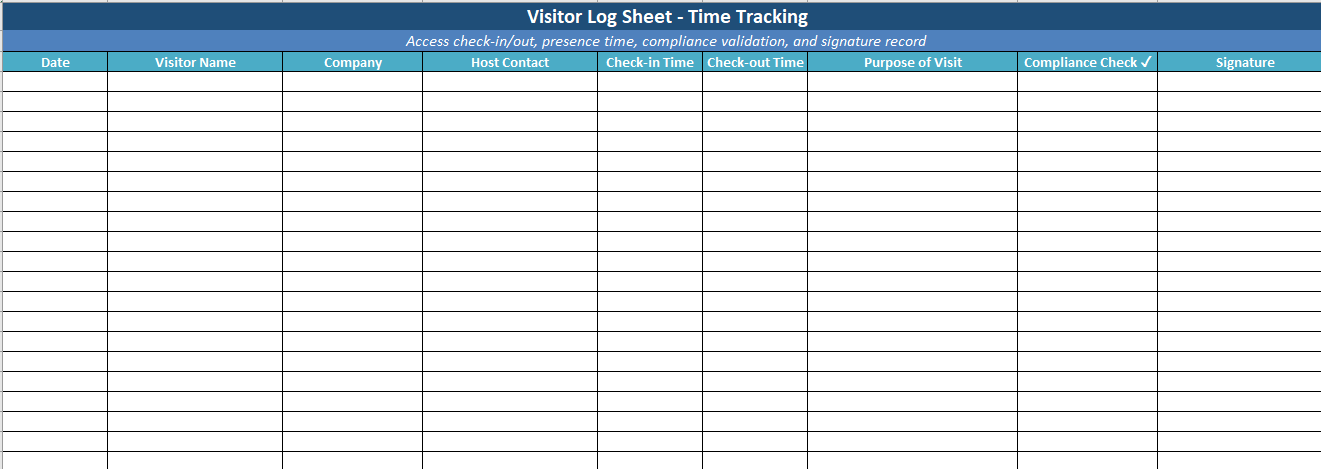
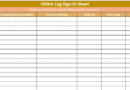
At first glance, it’s a straightforward document: name, time, who you’re here to see. But dig a little deeper, and one field stands out — Compliance Check.
That little checkbox at the end of the row? It’s not just symbolic. It represents something bigger: a commitment to safety, adherence to protocols, and accountability on both sides of the front desk.
In this article, we’ll explore what the compliance check means, why it matters, and how you can turn a simple sheet into a stronger part of your risk management framework.
So, What Is a Compliance Check?
In the context of a visitor log, the compliance check is usually a field — often a checkbox or signature block — that confirms a visitor has met certain preconditions before entering the premises. This could include:
- Reviewing site-specific safety rules
- Wearing required personal protective equipment (PPE)
- Signing a non-disclosure agreement (NDA)
- Verifying COVID-19 vaccination or test status (depending on policy)
- Accepting data privacy or photography restrictions
In short, the compliance check is the visitor’s acknowledgment that they’re not just entering a space — they’re entering a system with expectations.
Why a Compliance Field Changes the Game
You might be thinking, “Can’t we just assume visitors know the rules?”
The answer: no — and here’s why.
- Assumptions don’t hold up in audits. When regulatory bodies or clients come knocking, they want proof. A simple checkbox showing that a visitor confirmed their understanding of site rules can satisfy a compliance officer far more than a verbal explanation ever could.
- It creates legal clarity. If an incident occurs — say, a visitor ignores a safety protocol or enters a restricted zone — you now have documentation that expectations were communicated and agreed upon.
- It empowers the front desk. Receptionists and security personnel are often put in the position of gatekeeper. Having a clear compliance check gives them structure and authority. It’s not personal — it’s process.
- It reinforces your standards. People notice what you document. If a visitor logs in and sees a compliance check field, it tells them this is a workplace where standards matter.
What Makes a Good Compliance Check Section
It doesn’t need to be complicated. In fact, the more streamlined it is, the better it works. Here’s what the best visitor sign-in sheets with compliance fields tend to include:
- A clear label, like “Compliance Check” or “Requirements Acknowledged”
- A box to tick or space to sign — something that shows intent
- Optional fine print or symbols indicating what is being acknowledged (e.g., “✓ = Rules Reviewed”)
- Enough visual separation so it doesn’t blend in with less critical fields like “Time Out”
Most importantly, the compliance field should be backed by something real — either a handout, a verbal briefing, or signage — so that checking the box actually reflects an informed choice.
Examples of Compliance Triggers by Industry
Healthcare Facilities
Visitors may need to confirm they’re symptom-free, agree to wear a mask, or acknowledge that they’re entering a patient-sensitive area.
Construction Sites
Safety rules, required PPE, restricted access zones — all covered in a short form and confirmed via the compliance check.
Corporate Offices
Data privacy policies, phone usage restrictions, or NDA terms might be covered for vendors or clients entering workspaces.
Research Labs
Visitors often must agree to biohazard protocols, confidentiality agreements, or material handling rules — with the compliance field serving as proof of acknowledgment.
Training and Enforcement: Where Many Fall Short
The checkbox isn’t magic. It only works if your team enforces it.
- Train front-desk and security staff on when to deny access — for example, if a visitor refuses to acknowledge protocols.
- Make sure compliance content is available — whether in the form of a printed sheet, signage at the desk, or a short briefing.
- Keep logs secure and auditable. Your visitor log becomes part of your compliance evidence. Store it securely, and know where to find it if someone asks.
Digital or Paper: Does It Matter?
Not really — as long as the process is sound.
A paper sheet with a well-placed checkbox and a pen can do just as much heavy lifting as a fancy sign-in app. The key is that someone owns the process, and it’s used consistently.
Digital tools may give you automation (like alerts or dashboards), but they don’t replace discipline. Whether you use Excel, Google Forms, or an enterprise solution, the compliance check should still feel like a step — not a box you click through without thinking.
A Checkbox Is Not Just a Checkbox
It’s easy to overlook small fields on a form. But the compliance check is more than a formality — it’s the moment where your visitor shifts from outsider to participant in your environment.
It shows respect for your rules. It shows that your organization thinks ahead. And most of all, it gives you a mechanism — simple, repeatable, and clear — for making sure safety and standards aren’t just posters on the wall.
In a world where liability and expectations are only rising, that little checkbox at the end of your sign-in sheet might be one of the smartest security decisions you make all day.
Would you like this converted into a branded template, a PDF handout, or included in a security policy draft? I can help build those next.